
Simple setup. Free check. No panic.
A5 Flyer Artwork Setup Guide
Getting an A5 flyer ready for print doesn’t need to be complicated.
If you want to set it up properly yourself, this guide covers the ideal size, bleed, safe area and file setup.
Made it in Canva? Bought a template on Etsy? Created something with AI? Used another design app?
That’s fine too.
Send us the best-quality version you have and we’ll put it through our free 5-point artwork check before anything goes to print.
No print expertise required.
The useful numbers
A5 flyer size at a glance
Finished size
148mm × 210mm
With 3mm bleed
154mm × 216mm
Bleed
3mm around every edge
Safe area
Keep essential content comfortably inside the cut line
Preferred file
Free A5 artwork template
Download it. Drop your design in.
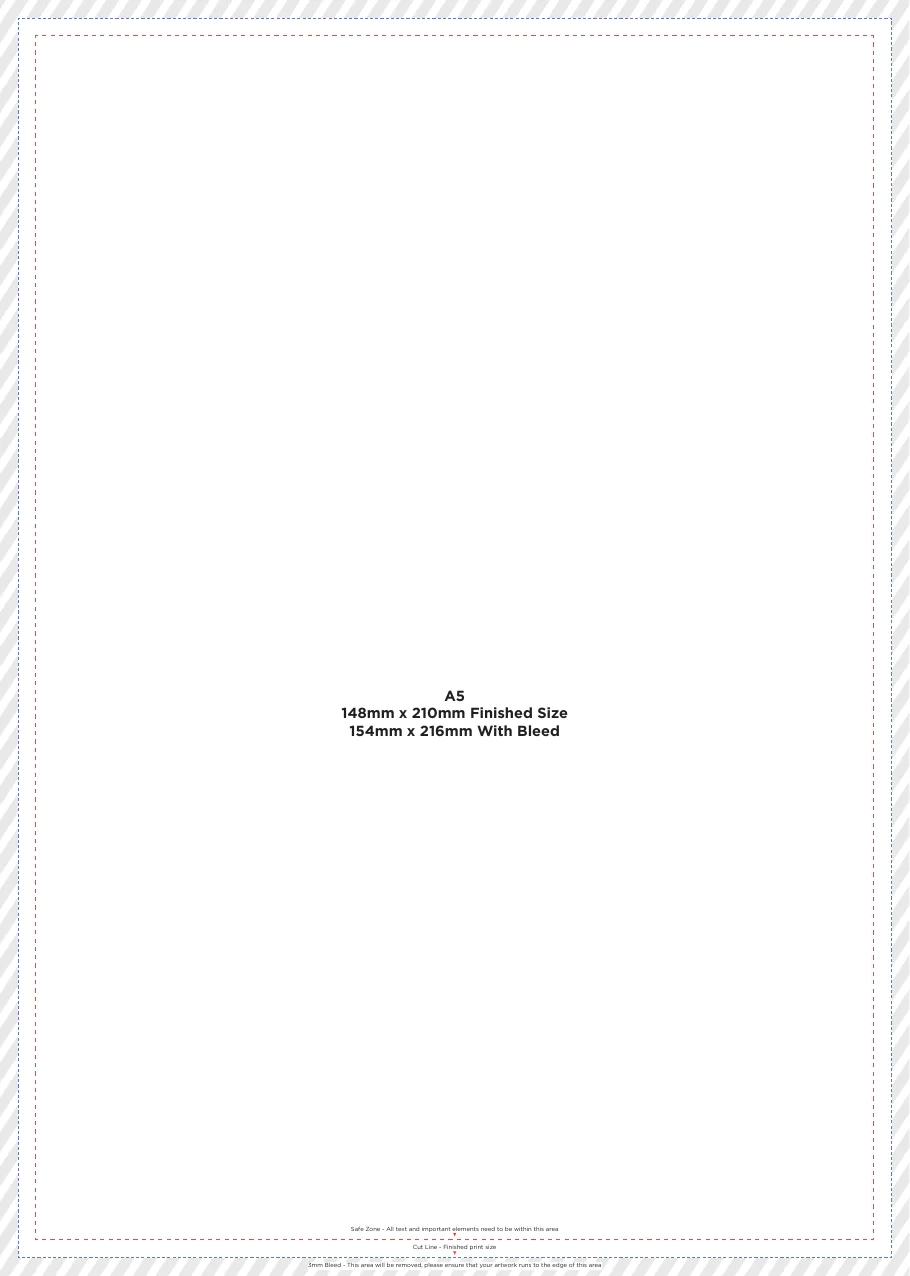
Our template shows the finished A5 size, cut line, 3mm bleed area and safe zone.
Download free A5 templateNo form. No email capture. No account. No sign-up.
Reading the template
What do the lines mean?
Cut line
This is where the flyer will be trimmed to its final A5 size.
Bleed
If a photo, colour or background should reach the edge, extend it 3mm beyond the finished edge. That extra area is trimmed away during finishing.
Safe zone
Keep important text, logos, contact details, QR codes and anything you definitely do not want trimmed comfortably inside the safe area.
Why do flyers need bleed?
Printing and trimming involve tiny manufacturing tolerances. Bleed makes sure colour and images still reach right to the edge after trimming instead of leaving an unwanted white line.
Everyday design tools welcome
Made it with something else?
Send it over.
Canva design? Etsy download? Photoshop artwork? AI-created flyer? PDF ready to go? No problem.
You don’t need specialist print software to order from Flyer Monster.
Send us the best-quality version you have and we’ll put it through our free 5-point artwork check before anything goes to print.

Canva

Etsy Downloads
Photoshop

AI-created artwork
PDF Ready to Print
Canva, Etsy, Adobe, ChatGPT and other third-party names and logos are trademarks of their respective owners. Flyer Monster is not affiliated with or endorsed by these platforms.
Can I print a Canva flyer?
Yes. Canva artwork is absolutely fine.
Export a high-quality PDF where possible and send it over.
If you’re unsure about bleed, size or export settings, don’t let that stop you ordering. We’ll check the artwork before print.
Designed yours in Canva? See our Canva Flyer Printing page.
Bought a flyer template on Etsy?
No problem.
Edit the template with your own details and send us the finished file. PDF is ideal, but send the best-quality version you have.
We’ll check the size, bleed, resolution and safe area before printing.
Designed it in Photoshop?
Great.
Send us the best-quality PDF, PSD export or high-resolution image you have and we’ll check it before print.
Created your flyer with AI?
That’s fine too.
Send us the highest-resolution version you have.
We’ll check whether it is suitable for A5 print and flag anything that looks too small, soft or unsuitable before printing.
Best file first
What file should I send?
PDF preferred.
A good-quality PDF is ideal. Don’t have a PDF? Don’t overthink it. Canva export? Etsy download? JPEG? PNG? AI-generated artwork? Send us the best-quality version you have and we’ll check it before print.
Keep it sharp
300dpi at finished size is ideal. Not sure what yours is? Send it over. If the artwork looks too low-resolution to print well, we’ll flag it during the free artwork check.
What about CMYK?
Commercial printing normally uses CMYK colour. If yours is already CMYK, great. If it is RGB, don’t panic. Send it over and we’ll check it. Printed colours can look slightly different from a backlit screen.
Keep the important stuff safe
Keep headlines, logos, phone numbers, email and website addresses, QR codes and important images away from the trim edge and comfortably inside the safe area.
Printing both sides?
Send us both sides. Ideally, use one two-page PDF or two clearly named files such as front.pdf and back.pdf. That’s it.
Not sure it’s perfect?
That’s what we’re here for.
Free 5-point artwork check
with every order
Your artwork does not have to arrive absolutely perfect. We check every order before print.
If we spot a straightforward issue we can safely correct, we’ll sort it where practical. If something needs your input or could affect the finished print, we’ll contact you before anything goes to print.
The free check is a practical production check, not full graphic design, proofreading, rewriting or major artwork reconstruction.
- 01Artwork size
- 02Bleed
- 03Image resolution
- 04Safe margins and important content
- 05Obvious print-production problems
Before you send it
- Artwork is roughly A5 proportion
- 3mm bleed added if backgrounds run to the edge
- Important text is away from the trim
- Images look reasonably sharp
- PDF preferred
- Both sides included if double sided
Missed something?
No problem.
That’s why every Flyer Monster order includes our free 5-point artwork check.
Straight answers
A5 artwork FAQs
Artwork ready?
Cheap bulk A5 flyers from 1,000 to 25,000 with a free 5-point artwork check.
View A5 flyer pricesNot sure about your file?
Order your flyers, reply to your confirmation email with the artwork and we’ll check it before print.
Order flyersNo account. No sign-up. No faff.